> ## Documentation Index
> Fetch the complete documentation index at: https://lago-ftr-wallet-improvements.mintlify.site/llms.txt
> Use this file to discover all available pages before exploring further.
# Grace period
**PREMIUM FEATURE** ✨
This feature is only available to users with a premium license. Please
**[contact us](mailto:hello@getlago.com)** to get access to Lago Cloud and Lago
Self-Hosted Premium.
A grace period is defined as a number days during which invoices remain in
`draft` status, allowing you to review them and make changes before they are
`finalized` and sent for payment collection.
In the example below, the timeline includes a billing period of one month and a
grace period of three days.
 ## Define a grace period at organization level[](#define-a-grace-period-at-organization-level "Direct link to heading")
The organization's grace period applies to all customers by default.
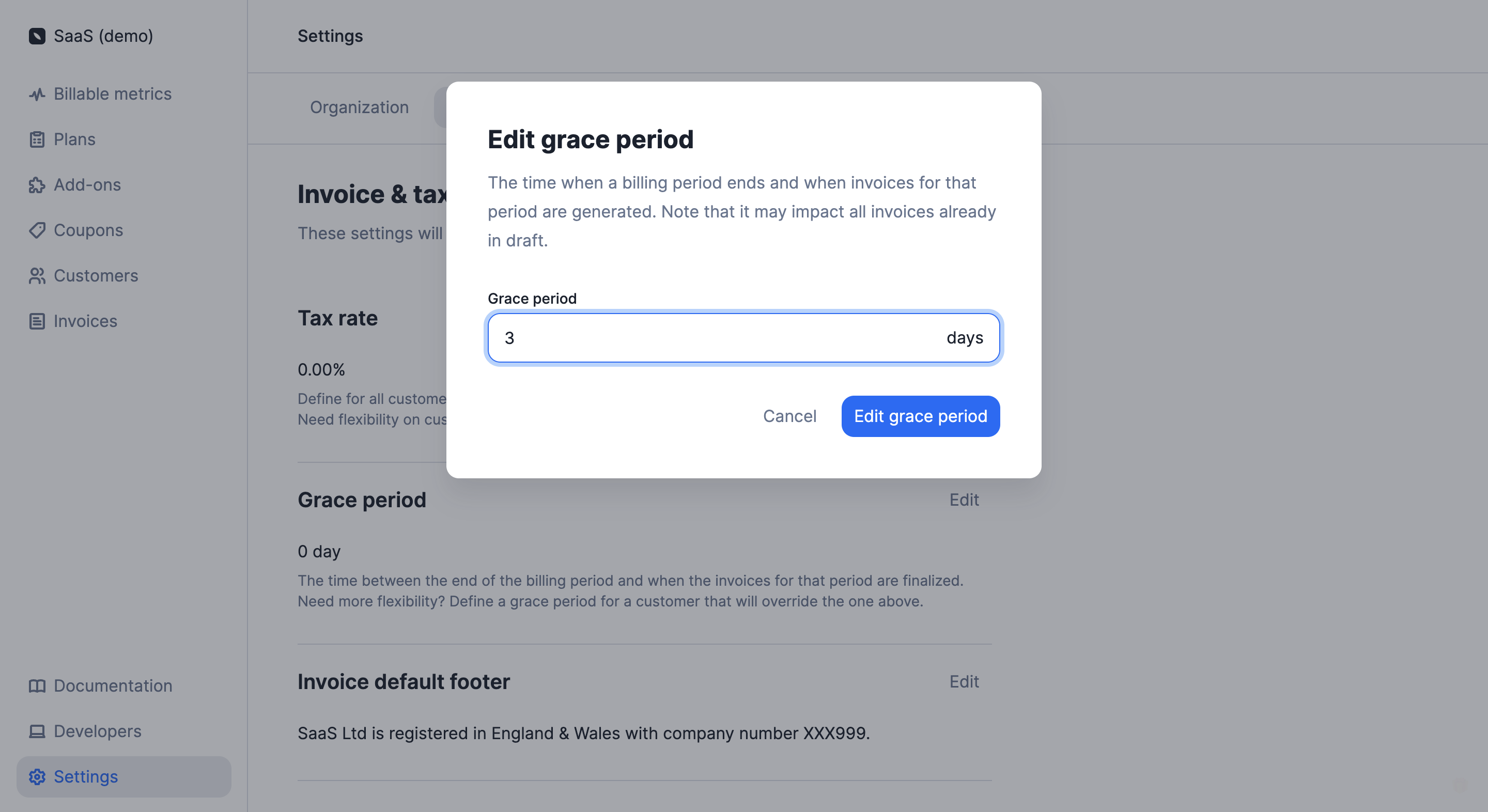
To define a grace period at organization level through the user interface:
1. Access the **"Settings"** section via the side menu;
2. Open the **"Invoice"** tab;
3. Click **"Edit"** in the **"Grace period"** section;
4. Enter the number of days associated with the grace period; and
5. Click **"Edit grace period"** to confirm.
## Define a grace period at organization level[](#define-a-grace-period-at-organization-level "Direct link to heading")
The organization's grace period applies to all customers by default.
To define a grace period at organization level through the user interface:
1. Access the **"Settings"** section via the side menu;
2. Open the **"Invoice"** tab;
3. Click **"Edit"** in the **"Grace period"** section;
4. Enter the number of days associated with the grace period; and
5. Click **"Edit grace period"** to confirm.
 If you shorten the organization's grace period, some invoices in `draft`
status may be automatically `finalized`. For instance, if the initial grace
period was five days, but then three days into the grace period you decide to
reduce it to two days, then all `draft` invoices will automatically switch to
`finalized`.
You can also modify the organization's grace period at any time through [the API](/api-reference/organizations/update).
Define a grace period in days by using the `invoice_grace_period` argument in the `billing_configuration` object at an organization level.
```bash Add a grace period on the organization
LAGO_URL="https://api.getlago.com"
API_KEY="__YOUR_API_KEY__"
curl --location --request PUT "$LAGO_URL/api/v1/organizations" \
--header "Authorization: Bearer $API_KEY" \
--header 'Content-Type: application/json' \
--data-raw '{
"organization": {
"name": "Name1",
"webhook_url": "https://test-example.example",
"country": "CZ",
"address_line1": "address1",
"address_line2": null,
"state": "state1",
"zipcode": "10000",
"email": "org@email.com",
"city": "city125",
"legal_name": null,
"legal_number": null,
"tax_identification_number": "EU123456789",
"timezone": "Europe/Paris",
"email_settings": [
"invoice.finalized",
"credit_note.created"
],
"billing_configuration": {
"invoice_footer": "footer custom",
"invoice_grace_period": 3,
"document_locale": "fr",
"vat_rate": 15.0
}
}
}'
```
## Define a grace period at customer level[](#define-a-grace-period-at-customer-level "Direct link to heading")
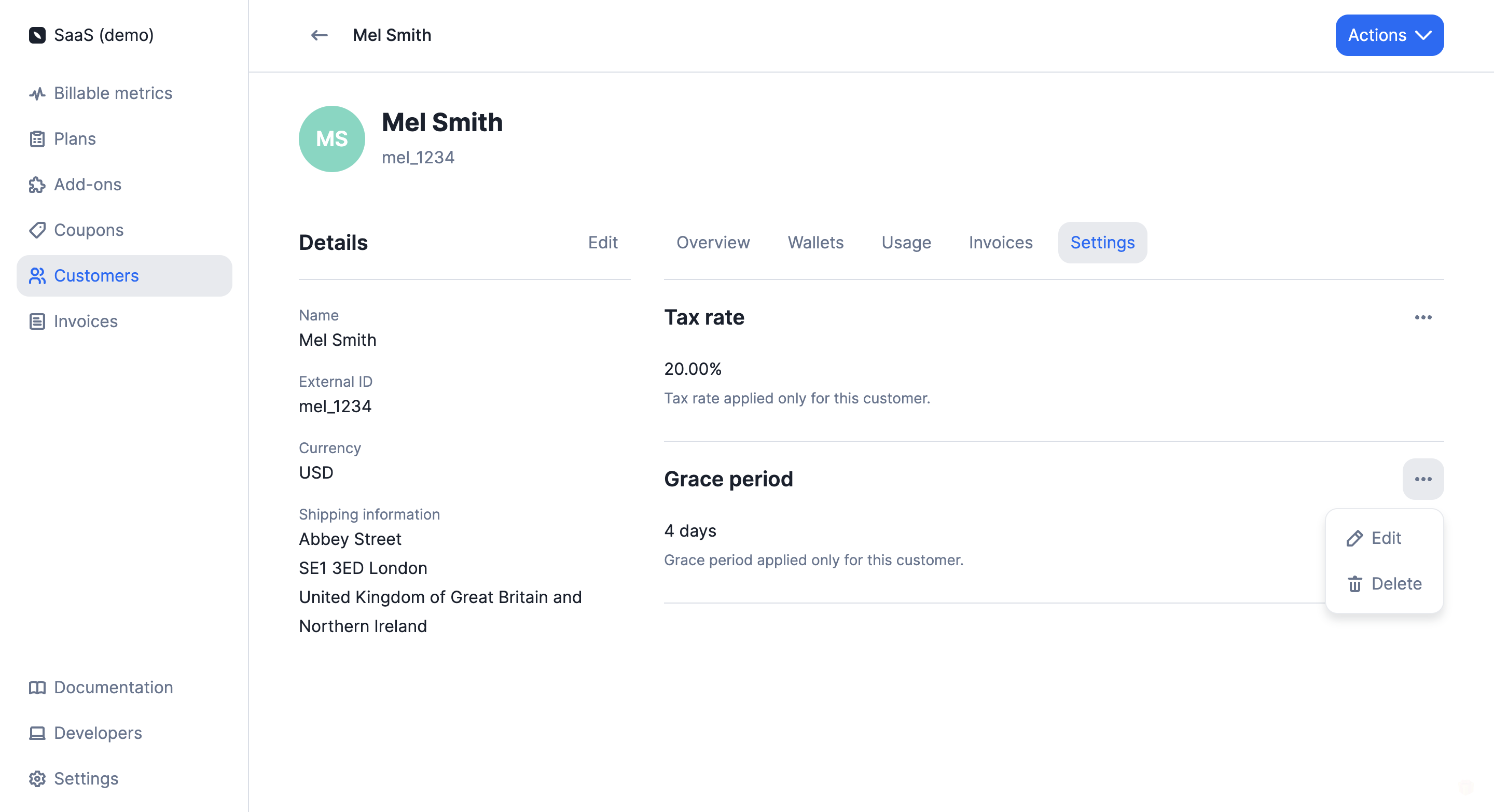
To define a grace period at customer level through the user interface:
1. Access the **"Customers"** section via the side menu;
2. Select a customer from the list;
3. Open the **"Settings"** tab of the customer view;
4. Click **"Add grace period"** in the **"Grace period"** section;
5. Enter the number of days associated with the grace period; and
6. Click **"Add grace period"** to confirm.
If you shorten the organization's grace period, some invoices in `draft`
status may be automatically `finalized`. For instance, if the initial grace
period was five days, but then three days into the grace period you decide to
reduce it to two days, then all `draft` invoices will automatically switch to
`finalized`.
You can also modify the organization's grace period at any time through [the API](/api-reference/organizations/update).
Define a grace period in days by using the `invoice_grace_period` argument in the `billing_configuration` object at an organization level.
```bash Add a grace period on the organization
LAGO_URL="https://api.getlago.com"
API_KEY="__YOUR_API_KEY__"
curl --location --request PUT "$LAGO_URL/api/v1/organizations" \
--header "Authorization: Bearer $API_KEY" \
--header 'Content-Type: application/json' \
--data-raw '{
"organization": {
"name": "Name1",
"webhook_url": "https://test-example.example",
"country": "CZ",
"address_line1": "address1",
"address_line2": null,
"state": "state1",
"zipcode": "10000",
"email": "org@email.com",
"city": "city125",
"legal_name": null,
"legal_number": null,
"tax_identification_number": "EU123456789",
"timezone": "Europe/Paris",
"email_settings": [
"invoice.finalized",
"credit_note.created"
],
"billing_configuration": {
"invoice_footer": "footer custom",
"invoice_grace_period": 3,
"document_locale": "fr",
"vat_rate": 15.0
}
}
}'
```
## Define a grace period at customer level[](#define-a-grace-period-at-customer-level "Direct link to heading")
To define a grace period at customer level through the user interface:
1. Access the **"Customers"** section via the side menu;
2. Select a customer from the list;
3. Open the **"Settings"** tab of the customer view;
4. Click **"Add grace period"** in the **"Grace period"** section;
5. Enter the number of days associated with the grace period; and
6. Click **"Add grace period"** to confirm.
 If you shorten the customer's grace period, some invoices in `draft` status
may be automatically `finalized`. For instance, if the initial grace period
was five days, but then three days into the grace period you decide to reduce
it to two days, then all `draft` invoices will automatically switch to
`finalized`.
You can also modify the customer's grace period at any time through the user interface or [the API](/api-reference/customers/create).
Define a grace period in days by using the `invoice_grace_period` argument in the `billing_configuration` object at a customer level.
```bash Add a grace period on the customer
LAGO_URL="https://api.getlago.com"
API_KEY="__YOUR_API_KEY__"
curl --location --request POST "$LAGO_URL/api/v1/customers" \
--header "Authorization: Bearer $API_KEY" \
--header 'Content-Type: application/json' \
--data-raw '{
"customer": {
"external_id": "5eb02857-a71e-4ea2-bcf9-57d3a41bc6ba",
"address_line1": "5230 Penfield Ave",
"address_line2": "",
"city": "Woodland Hills",
"country": "US",
"currency": "EUR",
"email": "dinesh@piedpiper.test",
"legal_name": "Coleman-Blair",
"legal_number": "49-008-2965",
"tax_identification_number": "EU123456789",
"logo_url": "http://hooli.com/logo.png",
"name": "Gavin Belson",
"phone": "1-171-883-3711 x245",
"state": "CA",
"timezone": "Europe/Paris",
"url": "http://hooli.com",
"zipcode": "91364",
"tax_codes": []
"billing_configuration": {
"invoice_grace_period": 3,
"payment_provider": "stripe",
"provider_customer_id": "cus_12345",
"sync": true,
"sync_with_provider": true,
"document_locale": "fr",
},
"metadata": [
{
"key": "Name",
"value": "John",
"display_in_invoice": true
}
]
}
}'
```
The customer's grace period overrides the organization's grace period. It only
applies to the customer with whom it is associated.
## Application scope and possible actions[](#application-scope-and-possible-actions "Direct link to heading")
The grace period applies to **subscription invoices**. It does not apply to
invoices related to add-ons or credit purchases.
The creation of a `draft` invoice triggers the `invoice.drafted`
[webhook](/api-reference/webhooks/messages).
When a subscription invoice is in `draft` status, you can:
* **Add usage records** by sending events with a `timestamp` within the relevant
billing period;
* **Edit a specific fee** by adjusting the total amount or the total units;
* **Apply coupons** to the customer's account; and
* **Add credits** to the customer's wallet and credit note wallet.
### Edit a specific fee
To edit a specific fee, follow these steps in the Dashboard:
1. Open a draft invoice's details page;
2. Click the 'three dots' icon next to the desired fee;
3. Change the invoice's display name if needed; and/or
4. Select either `Total amount` or `Total unit` for adjustment;
5. For `Total amount`, enter units and unit amount. Note: This will overwrite existing fee details.
6. For `Total unit`, input new units. Lago will then automatically recalculate the fee based on the charge model.
This action is exclusive to the Dashboard.
### Add usage records
In order to add usage to an invoice that is in `draft` status, the `timestamp`
of the [events](/guide/events/ingesting-usage) must be
within the billing period. Consider the following example:
> The billing period started on January 1st and ended on January 31st. We have
> defined a 3-day grace period and today is February 2nd.
>
> On February 1st, Lago automatically generated a `draft` invoice for the period
> January 1st to January 31st.
>
> We want to send additional usage records for this invoice. To do so, the
> timestamp of our events must be included in the period January 1st to January
> 31st.
>
> `1673457300` (i.e. January 11th, 2023) is a valid timestamp, therefore the
> event will be included in the `draft` invoice.
>
> However, `1675354500` (i.e. February 2nd, 2023) is outside the billing period
> under consideration, therefore the event will not be included in the `draft`
> invoice, it will be included in the next invoice.
After sending events, you can **go to the invoice list and refresh** the
corresponding `draft` invoice to ensure your new events have been taken into
account.
When all changes have been made, you can either wait for the grace period to
expire (the invoice status will automatically switch to `finalized`) or you can
**finalize the invoice manually** through the user interface or the API.
When an invoice is `finalized`, it can no longer be edited. Finalizing an
invoice triggers the `invoice.created` webhook.
If you shorten the customer's grace period, some invoices in `draft` status
may be automatically `finalized`. For instance, if the initial grace period
was five days, but then three days into the grace period you decide to reduce
it to two days, then all `draft` invoices will automatically switch to
`finalized`.
You can also modify the customer's grace period at any time through the user interface or [the API](/api-reference/customers/create).
Define a grace period in days by using the `invoice_grace_period` argument in the `billing_configuration` object at a customer level.
```bash Add a grace period on the customer
LAGO_URL="https://api.getlago.com"
API_KEY="__YOUR_API_KEY__"
curl --location --request POST "$LAGO_URL/api/v1/customers" \
--header "Authorization: Bearer $API_KEY" \
--header 'Content-Type: application/json' \
--data-raw '{
"customer": {
"external_id": "5eb02857-a71e-4ea2-bcf9-57d3a41bc6ba",
"address_line1": "5230 Penfield Ave",
"address_line2": "",
"city": "Woodland Hills",
"country": "US",
"currency": "EUR",
"email": "dinesh@piedpiper.test",
"legal_name": "Coleman-Blair",
"legal_number": "49-008-2965",
"tax_identification_number": "EU123456789",
"logo_url": "http://hooli.com/logo.png",
"name": "Gavin Belson",
"phone": "1-171-883-3711 x245",
"state": "CA",
"timezone": "Europe/Paris",
"url": "http://hooli.com",
"zipcode": "91364",
"tax_codes": []
"billing_configuration": {
"invoice_grace_period": 3,
"payment_provider": "stripe",
"provider_customer_id": "cus_12345",
"sync": true,
"sync_with_provider": true,
"document_locale": "fr",
},
"metadata": [
{
"key": "Name",
"value": "John",
"display_in_invoice": true
}
]
}
}'
```
The customer's grace period overrides the organization's grace period. It only
applies to the customer with whom it is associated.
## Application scope and possible actions[](#application-scope-and-possible-actions "Direct link to heading")
The grace period applies to **subscription invoices**. It does not apply to
invoices related to add-ons or credit purchases.
The creation of a `draft` invoice triggers the `invoice.drafted`
[webhook](/api-reference/webhooks/messages).
When a subscription invoice is in `draft` status, you can:
* **Add usage records** by sending events with a `timestamp` within the relevant
billing period;
* **Edit a specific fee** by adjusting the total amount or the total units;
* **Apply coupons** to the customer's account; and
* **Add credits** to the customer's wallet and credit note wallet.
### Edit a specific fee
To edit a specific fee, follow these steps in the Dashboard:
1. Open a draft invoice's details page;
2. Click the 'three dots' icon next to the desired fee;
3. Change the invoice's display name if needed; and/or
4. Select either `Total amount` or `Total unit` for adjustment;
5. For `Total amount`, enter units and unit amount. Note: This will overwrite existing fee details.
6. For `Total unit`, input new units. Lago will then automatically recalculate the fee based on the charge model.
This action is exclusive to the Dashboard.
### Add usage records
In order to add usage to an invoice that is in `draft` status, the `timestamp`
of the [events](/guide/events/ingesting-usage) must be
within the billing period. Consider the following example:
> The billing period started on January 1st and ended on January 31st. We have
> defined a 3-day grace period and today is February 2nd.
>
> On February 1st, Lago automatically generated a `draft` invoice for the period
> January 1st to January 31st.
>
> We want to send additional usage records for this invoice. To do so, the
> timestamp of our events must be included in the period January 1st to January
> 31st.
>
> `1673457300` (i.e. January 11th, 2023) is a valid timestamp, therefore the
> event will be included in the `draft` invoice.
>
> However, `1675354500` (i.e. February 2nd, 2023) is outside the billing period
> under consideration, therefore the event will not be included in the `draft`
> invoice, it will be included in the next invoice.
After sending events, you can **go to the invoice list and refresh** the
corresponding `draft` invoice to ensure your new events have been taken into
account.
When all changes have been made, you can either wait for the grace period to
expire (the invoice status will automatically switch to `finalized`) or you can
**finalize the invoice manually** through the user interface or the API.
When an invoice is `finalized`, it can no longer be edited. Finalizing an
invoice triggers the `invoice.created` webhook.
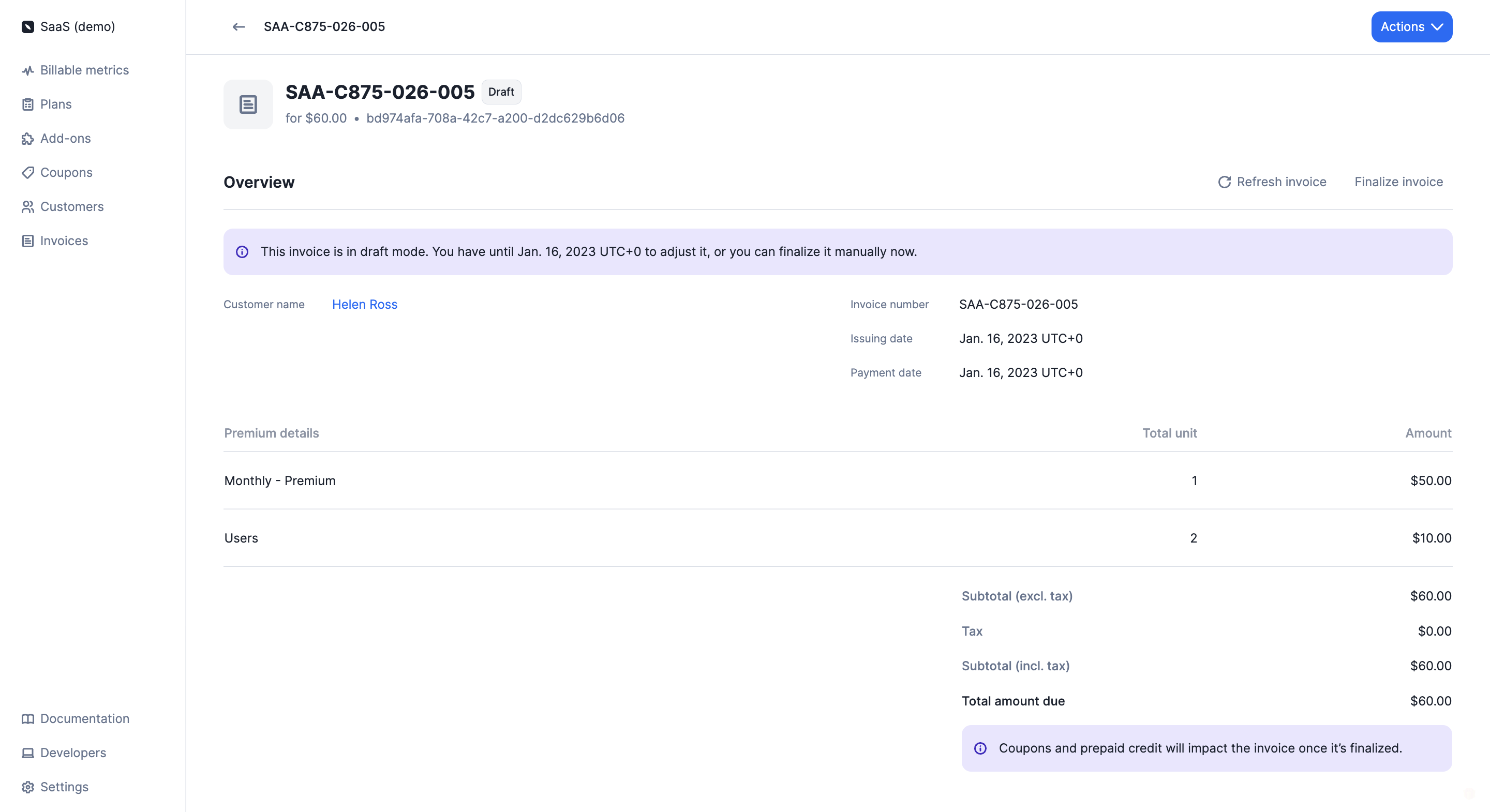 Coupons and credits that are applied/added during the grace period will not
appear on `draft` invoices but will be automatically deducted from the
customer's next `finalized` invoice.
Coupons and credits that are applied/added during the grace period will not
appear on `draft` invoices but will be automatically deducted from the
customer's next `finalized` invoice.