> ## Documentation Index
> Fetch the complete documentation index at: https://lago-ftr-wallet-improvements.mintlify.site/llms.txt
> Use this file to discover all available pages before exploring further.
# Payment retries
Whether you use one of our native integrations or rely on our
[webhooks](/api-reference/webhooks/messages) to collect payments, you have the ability to
manually resend payments for collection when needed.
To re-trigger the payment process through the user interface:
1. Access the **"Invoices"** section via the side menu;
2. Open the **"Pending/Failed"** tab;
3. Find the invoice for which you would like to collect payment;
4. Click the **ellipsis icon** on the right; and
5. Select **"Resend for collection"**.
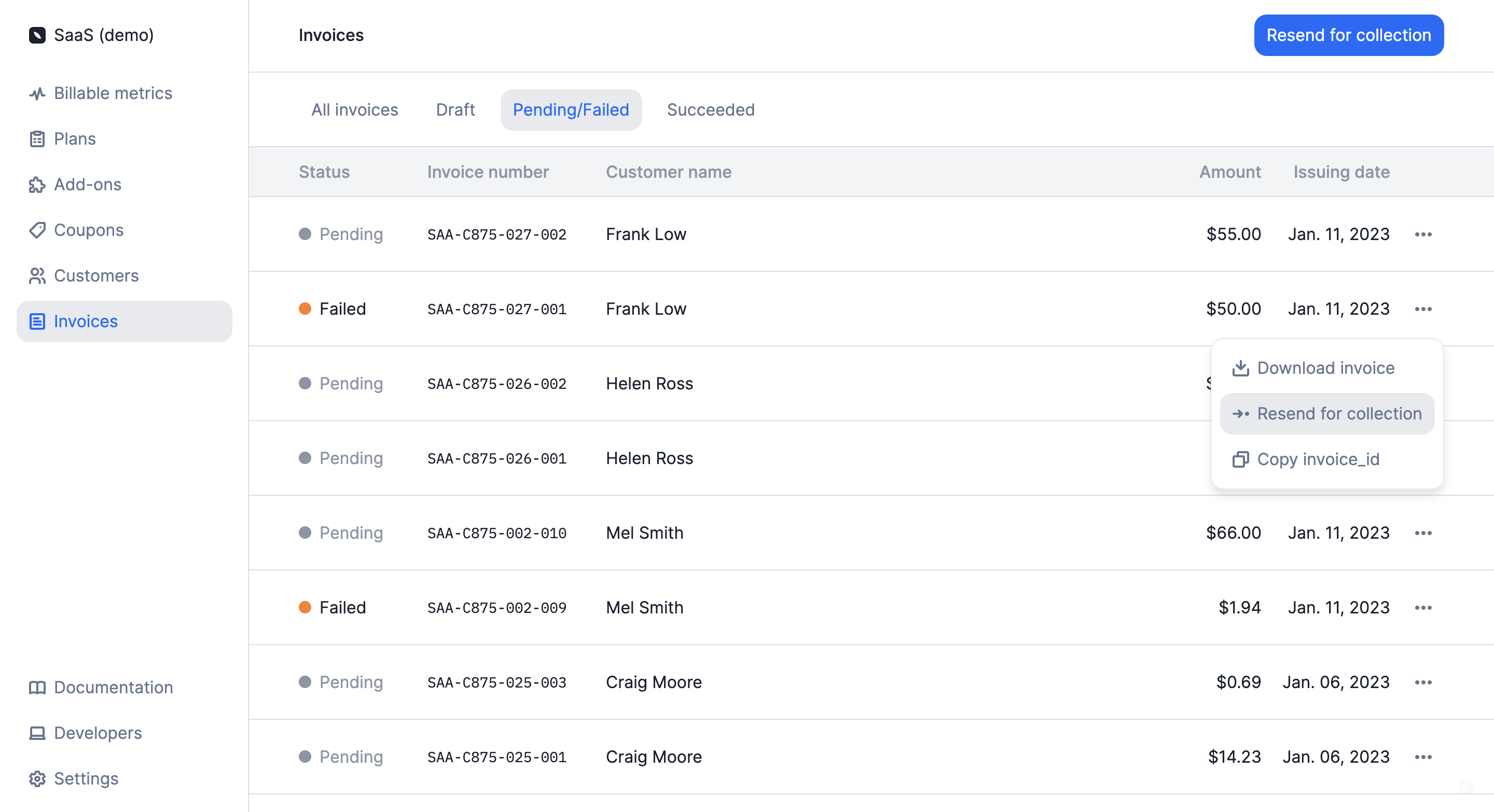 In the **"Pending/Failed"** tab of the **"Invoices"** section, you can also
click **"Resend for collection"** in the upper right corner to re-trigger the
payment process for all invoices in the list.
When a payment is resent for collection, an `invoice.created` or
`invoice.add_on_added` webhook is automatically sent, depending on the type of
invoice.
In addition to this, if the default payment provider for the customer is
[Stripe](/guide/payments/stripe-integration),
[GoCardless](/guide/payments/gocardless-integration) or [Adyen](/guide/payments/adyen-integration), Lago will automatically process
the payment through integration.
It is also possible to trigger payment retries via the API
([learn more](/api-reference/invoices/retry)).
In the **"Pending/Failed"** tab of the **"Invoices"** section, you can also
click **"Resend for collection"** in the upper right corner to re-trigger the
payment process for all invoices in the list.
When a payment is resent for collection, an `invoice.created` or
`invoice.add_on_added` webhook is automatically sent, depending on the type of
invoice.
In addition to this, if the default payment provider for the customer is
[Stripe](/guide/payments/stripe-integration),
[GoCardless](/guide/payments/gocardless-integration) or [Adyen](/guide/payments/adyen-integration), Lago will automatically process
the payment through integration.
It is also possible to trigger payment retries via the API
([learn more](/api-reference/invoices/retry)).