> ## Documentation Index
> Fetch the complete documentation index at: https://lago-ftr-wallet-improvements.mintlify.site/llms.txt
> Use this file to discover all available pages before exploring further.
# Lago EU Taxes
Lago now features an automatic European tax detection integration for your customers.
## Enable Lago's EU Tax integration
Activate Lago's automatic EU tax detection in just a few steps:
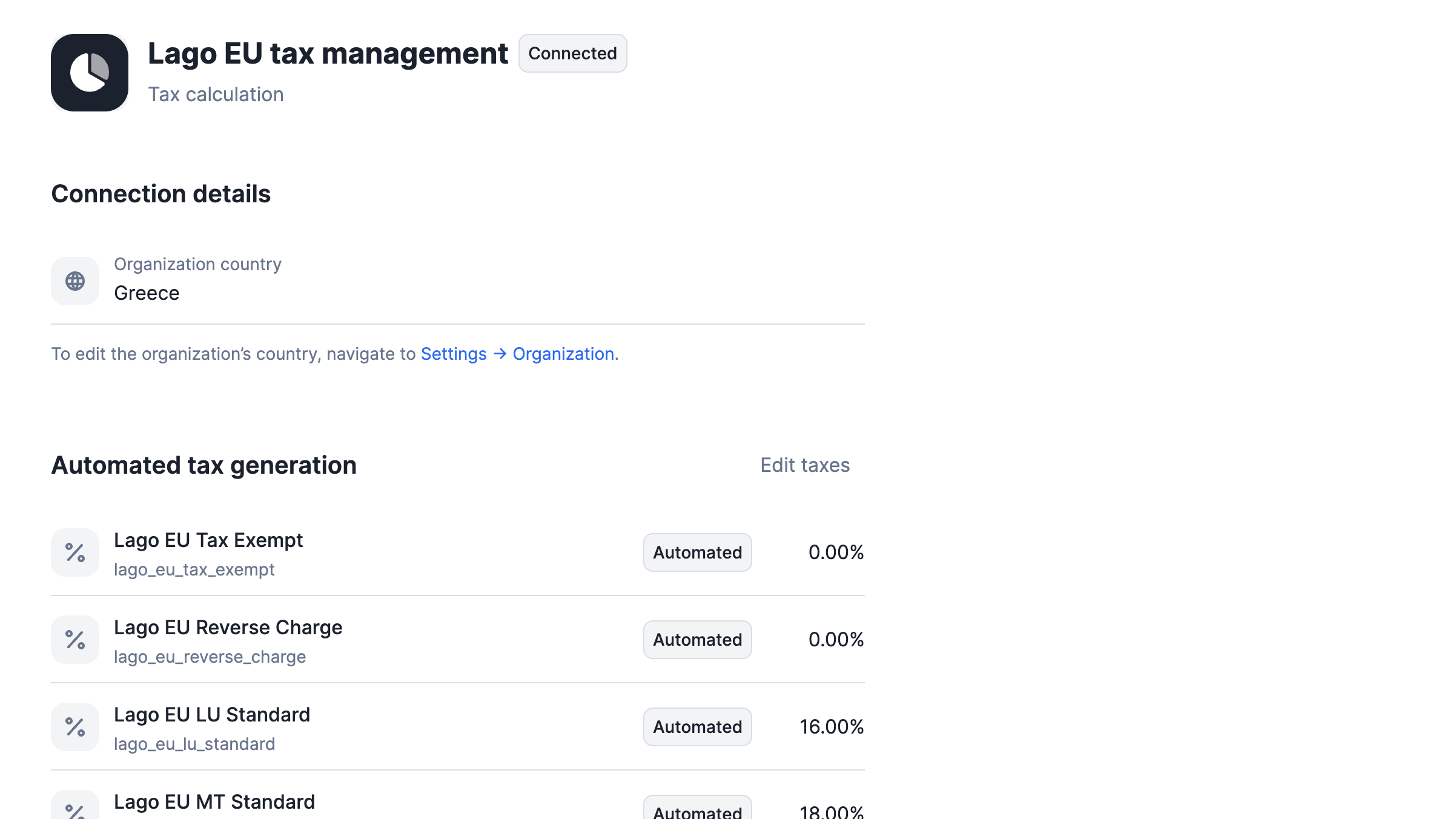
1. Navigate to your Lago instance **Settings**;
2. Select the **'Lago EU Tax Management'** integration;
3. Enter or confirm your organization's country; and
4. Hit **'Connect'** to activate this integration.
## Automated EU tax rates detection
When you connect the Lago EU Tax Management integration, it automatically generates a list of standard European tax rates.
These rates, labeled as `automated` in Lago, are synchronized with the latest standard tax rates for European countries,
ensuring your tax calculations are always up-to-date and compliant.
Each tax rate begins with the `lago_` prefix, ensuring a uniform and easily identifiable format across your tax rate list.
This systematic approach simplifies the management and recognition of these automated tax entries within your system.
 ## Auto-application of taxes: decision tree
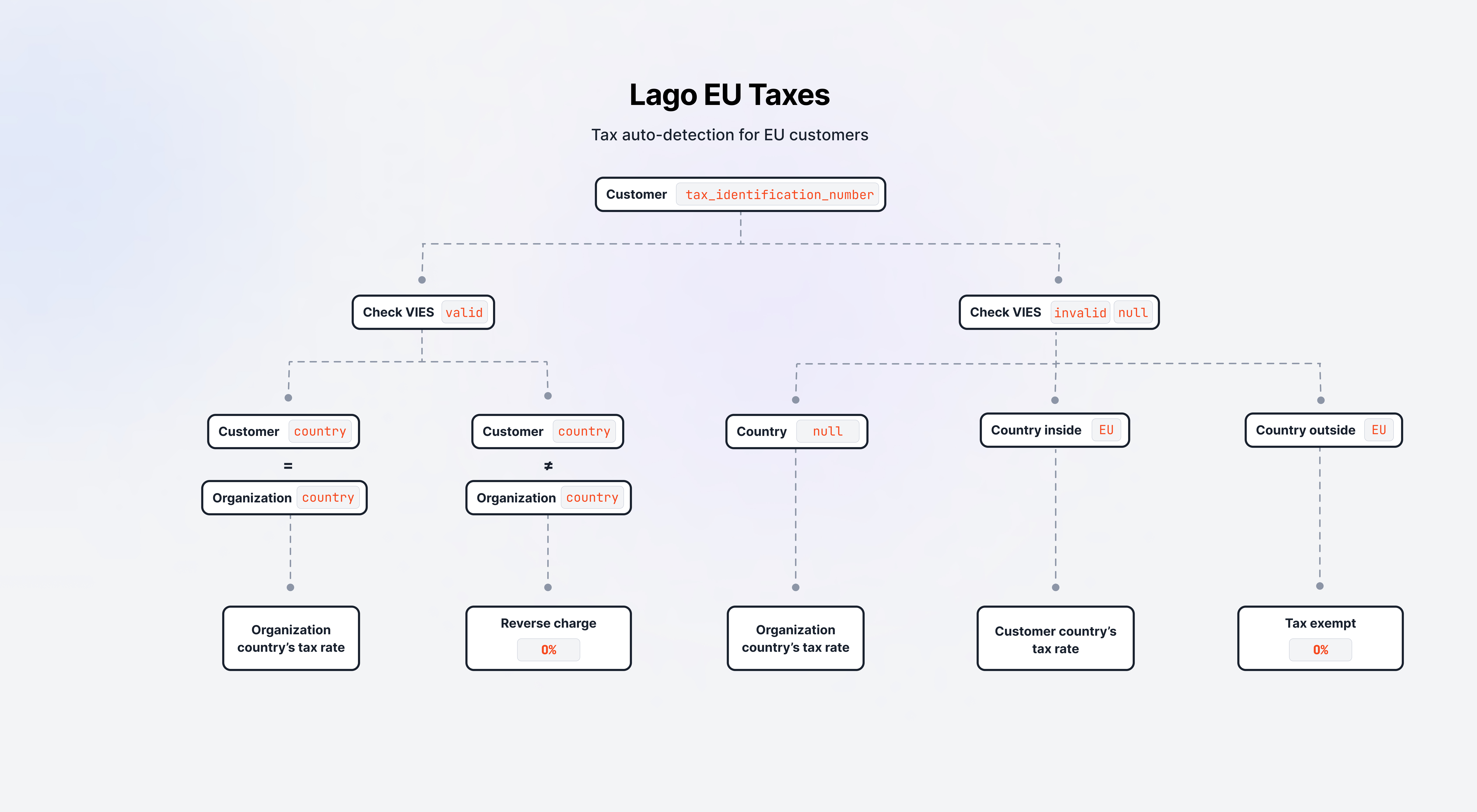 Lago's initial step in the automated tax application involves verifying if a customer has a `tax_identification_number`.
This check occurs whenever a customer's profile is created or updated, ensuring that the most current tax-related information
is used in subsequent processes.
### B2B tax decision process
When a `tax_identification_number` is identified on a customer profile, Lago conducts a real-time verification
using the [EU's VAT Information Exchange System (VIES)](https://ec.europa.eu/taxation_customs/vies/#/vat-validation) to
confirm the existence of the company.
**In case the VIES check matches a valid company:**
1. If the customer's company is registered in the same country as your organization, Lago applies your organization
country's tax rate; or
2. If the customer's company is registered in a different country than your organization, Lago implements a
**reverse charge** mechanism, applying a 0% tax rate.
### B2C tax decision process
If the VIES check does not confirm an active company or if no `tax_identification_number` is provided,
Lago then assesses the `country` associated with your customer. Based on this:
1. If your customer's `country` is unspecified, Lago defaults to applying your organization's country tax rate; or
2. If your customer's `country` is within the European Union, Lago applies the tax rate corresponding your customer's EU country; or
3. If your customer's `country` is outside the European Union, Lago applies a **tax exempt** rate at 0%.
## Guidelines for VIES checks by Lago
Lago performs VIES verifications under these circumstances:
* The Lago EU Tax Management integration is activated;
* A customer profile is either created or updated. Changes in customer details could influence their applicable tax rates:
* When a new tax rate is identified for a customer, Lago automatically updates the customer's profile by replacing the old tax rate with the new one.
## Logging VIES verifications
Lago ensures transparency and compliance by logging each VIES check. This occurs whenever you create or update a customer.
For each check, Lago dispatches a webhook message. This allows you to record these validations for compliance purposes.
You can access and review any of these automated checks as needed.
Lago's initial step in the automated tax application involves verifying if a customer has a `tax_identification_number`.
This check occurs whenever a customer's profile is created or updated, ensuring that the most current tax-related information
is used in subsequent processes.
### B2B tax decision process
When a `tax_identification_number` is identified on a customer profile, Lago conducts a real-time verification
using the [EU's VAT Information Exchange System (VIES)](https://ec.europa.eu/taxation_customs/vies/#/vat-validation) to
confirm the existence of the company.
**In case the VIES check matches a valid company:**
1. If the customer's company is registered in the same country as your organization, Lago applies your organization
country's tax rate; or
2. If the customer's company is registered in a different country than your organization, Lago implements a
**reverse charge** mechanism, applying a 0% tax rate.
### B2C tax decision process
If the VIES check does not confirm an active company or if no `tax_identification_number` is provided,
Lago then assesses the `country` associated with your customer. Based on this:
1. If your customer's `country` is unspecified, Lago defaults to applying your organization's country tax rate; or
2. If your customer's `country` is within the European Union, Lago applies the tax rate corresponding your customer's EU country; or
3. If your customer's `country` is outside the European Union, Lago applies a **tax exempt** rate at 0%.
## Guidelines for VIES checks by Lago
Lago performs VIES verifications under these circumstances:
* The Lago EU Tax Management integration is activated;
* A customer profile is either created or updated. Changes in customer details could influence their applicable tax rates:
* When a new tax rate is identified for a customer, Lago automatically updates the customer's profile by replacing the old tax rate with the new one.
## Logging VIES verifications
Lago ensures transparency and compliance by logging each VIES check. This occurs whenever you create or update a customer.
For each check, Lago dispatches a webhook message. This allows you to record these validations for compliance purposes.
You can access and review any of these automated checks as needed.